
Speechify Cost: Discover an honest review of Speechify—the powerful text-to-speech platform featuring premium voices, OCR, AI synthesis, and cross-platform support.
Over the past few days, I received a *premium* subscription from Mr. Rohan Pavuluri of the Speechify team (thank you so much! ❤️) to test out the app. Consequently, I have taken the liberty of writing a personal review of the platform and most of the features available for testing.
I enjoy writing honest product reviews on my blog whenever the opportunity arises; therefore, it is very important to mention that—in writing a sincere review (as I indicated in the headlines)—I maintain complete impartiality and evaluate the product exactly as it is.
In a Nutshell
For those who dislike reading lengthy reviews, I prefer to cut to the chase and let you know upfront whether or not a product is worth it. Speechify is a legitimate product; it is well-developed and backed by a great team—of that, I am certain (and, considering that I build web applications myself, you know I can spot that immediately).
In fact, after researching Speechify, I discovered that the company is quite large, with employees distributed across Europe, Asia, Africa, and the Americas. The product is excellent thanks to the solution it offers: reading content aloud for you and integrating seamlessly into your system to help you complete your tasks more quickly.
The free, limited plan is ideal for anyone looking to give the product a try. The only drawback I perceive—as a user based in South America—is the price of the premium plan. Let me explain: if I decide to purchase the “Complete Monthly Speechify Experience,” the cost is $29 per month (totaling $348 if I make monthly payments over the course of a year). For someone earning the minimum wage in my country (Colombia), that figure would represent approximately 8% of their monthly income.
However, they do offer an annual plan for $11.58 per month ($138.96 per year), which suggests they aim to incentivize users to commit to an annual subscription. While this price still feels somewhat steep for someone in South America, I am convinced that—for someone in the developed world—it could be considered a fair cost for maintaining the servers and AI models (yes, I know what goes into maintaining GPU-equipped servers).
Pros 👍
- A large portion of its voices are natural-sounding (though some are not), but with premium voices—such as those of MrBeast and Snoop Dogg—the result sounds very modern. It is important to note that using these high-quality branded voices may require obtaining the appropriate voice licensing agreements from the respective AI voice companies.
- Its application boasts impressive OCR capabilities; no matter what document you upload—even if it is an image-based PDF—the tool has you covered (most of the time).
- It integrates seamlessly with other applications—both for document selection and via its Chrome extension, which proves to be a fantastic tool.
- It offers cross-platform support, allowing you to use it on both your mobile devices and your desktop computer.
- It has been designed with accessibility in mind, combining visual and auditory learning styles, making it a useful tool for individuals with dyslexia and ADHD.
Cons 👎
- The product is not perfect; there will be documents that are not organized or interpreted correctly, so confusion may arise with PDF files that have a complex layout.
- In my personal opinion, it is expensive.
- It does not offer voice customization options; you have to settle for the voices they provide.
- I must be honest: it does not handle complex syntax—such as equations or programming code—very well, although it works correctly with plain text.
- Unfortunately, the issue of privacy is not entirely clear; uploading files to the cloud may not be a suitable option for everyone, especially in a business environment.
On a broader level, the perception of these trade-offs often depends on the context. For individual users, convenience and speed tend to be the top priorities. However, for businesses with complex workflows, tools like Speechify are typically evaluated alongside existing systems, data ownership requirements, and access control models.
In such cases, merchants operating on Magento often utilize a B2B extension suite for Magento to manage business accounts, permissions, and business-specific workflows, while tools like Speechify continue to address consumer and content-related needs.
Some incredible TTS (text-to-speech) applications are currently being developed—and even astonishing AI-driven conversational models, such as Sesame (try out this fantastic demo here). Speechify is truly excellent.
If you are a developer, there are many open-source solutions you might consider as alternatives (for example, GPT-SoVITS or Coqui AI’s TTS). But if you are a regular user, Speechify might be exactly what you need for your daily routine. Give Speechify a try!
That said, let’s start breaking down all the features Speechify has to offer.
1. Web Application
Speechify offers a web platform that can be accessed at https://app. On this online platform, you can use:
1.1. Library of uploaded documents
On the Speechify online platform, you can create your document library by uploading your files in various formats, such as:
- .docx (Word document)
- .epub (digital ebook)
- .xlsx (Excel)
- .txt (plain text files)
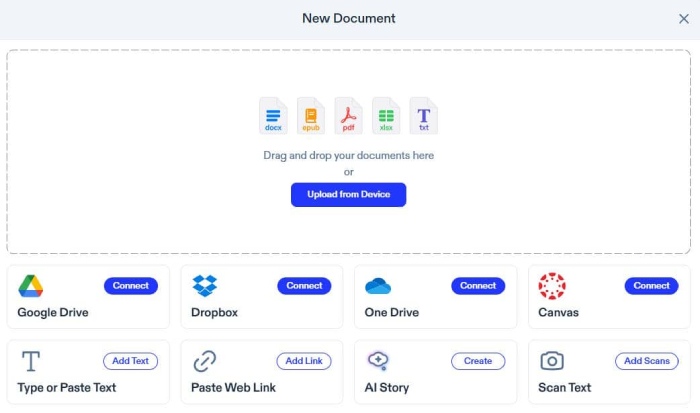
The platform will allow you to link your Google, Dropbox, OneDrive, or Canvas account to select files directly from your cloud.
1.2. Speechify your documents
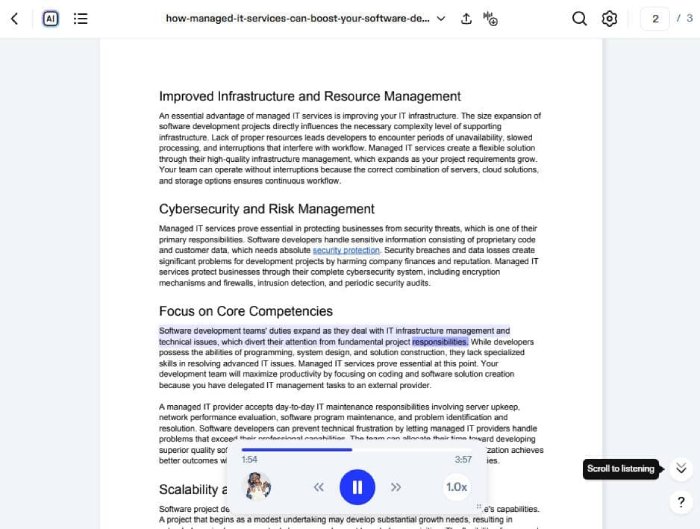
Speechify can read uploaded files using any of the voices it offers (including Snoop Dogg’s voice) and at your preferred speed. For lengthy or complex documents, improving the clarity of the text itself can make the listening experience even smoother.
A quick readability check—using Originality.ai’s *Readability Check* tool—can help you identify hard-to-follow sentences or overly dense sections before processing them with the text-to-speech (TTS) system.
The voice-over feature highlights the word currently being spoken, and a progress indicator shows you how much of the document has already been read:
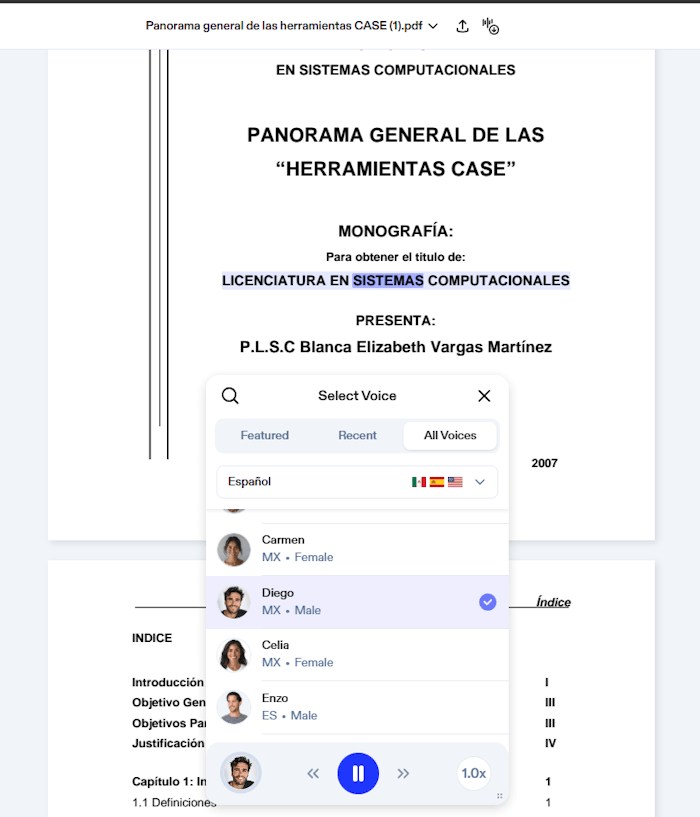
Something well worth mentioning is that they offer TTS for over 50 languages: English, German, Spanish, Russian, and many more.
1.3. Prompt your documents with AI
Beyond Speechify’s text-to-speech (TTS) conversion feature, you can utilize its AI module, which allows you to interact via prompts with the documents you have uploaded—optimizing your reading by requesting key information about the content or even easily generating a summary of the entire document.
While this is ideal for individual study, teams seeking a more collaborative way to query their entire corporate knowledge base should consider an AI platform with agentic capabilities, such as QueryPal; this device enables users to ask questions and receive answers directly within the application, which can then be immediately shared in their documentation or on Teams.
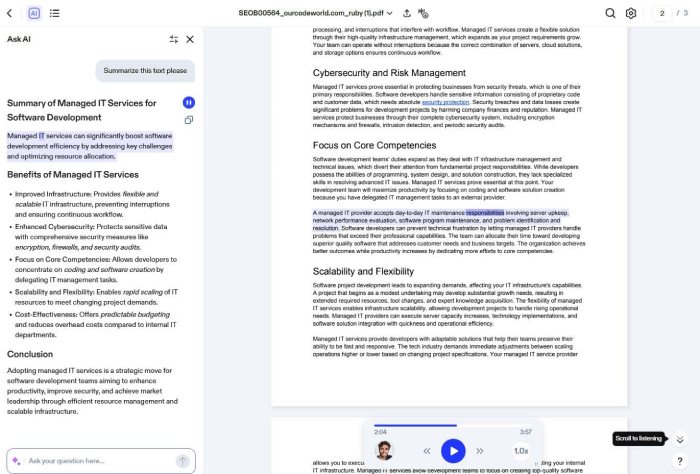
1.4. Convert your documents to MP3
Speechify allows you to convert your documents to MP3. You simply need to select the voice you want (including the language), as well as the specific pages or the entire document.
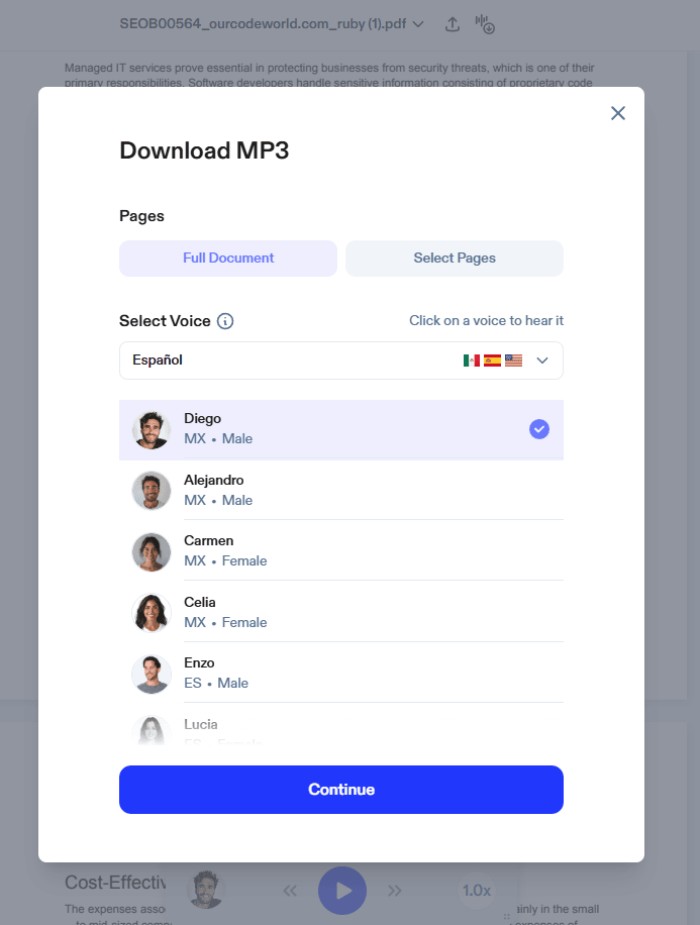
Within seconds or minutes (depending on the length of your document), the platform will allow you to start downloading the MP3 file.
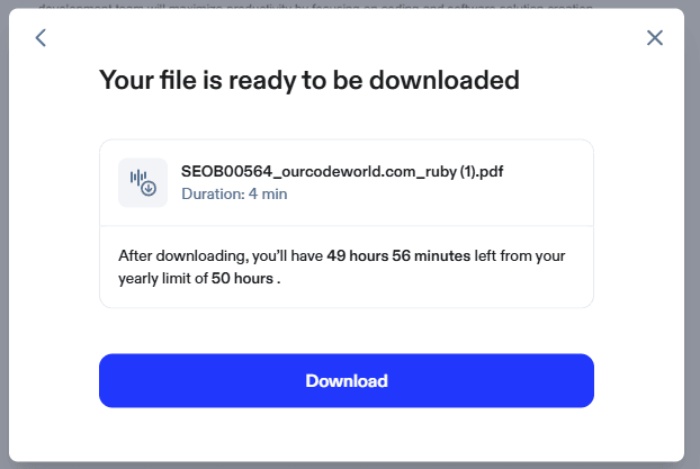
In my case, the audio was 4 minutes long and took about 50 seconds to download. However, the service does have a limitation—even on the premium plan—which consists of a cap on MP3 file generation: you can only export 50 hours of audio per account per year.
2. Chrome Extension
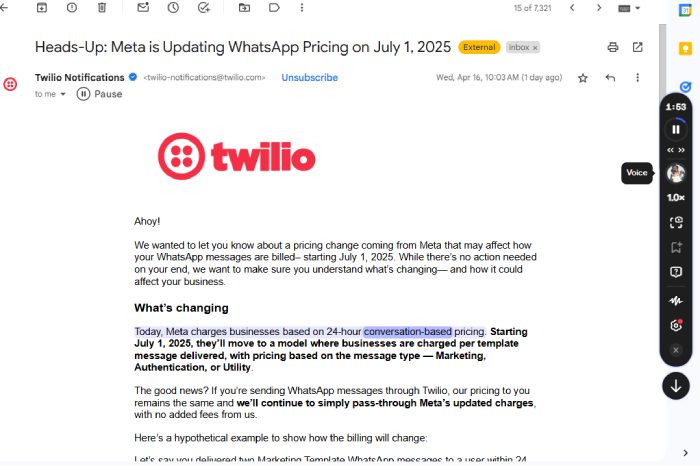
Speechify offers a Chrome extension that you can install on your device and use on any website or web application. Once downloaded, getting started is very simple: log in with your account, and you can use it in three different ways:

For example, I was able to use it in my inbox—carrying out my usual work just as always—while listening to the emails I received yesterday:
3. Mobile app
A mobile version of Speechify is available for both Android and iOS. In my case, I own an iPhone and tested the app on that device as well; the thought remains the same: you can select files from your library—files that you can download from local sources or from the cloud. An interesting feature of the mobile version of the app is that it gives you access to free books that can be played exclusively through Speechify:
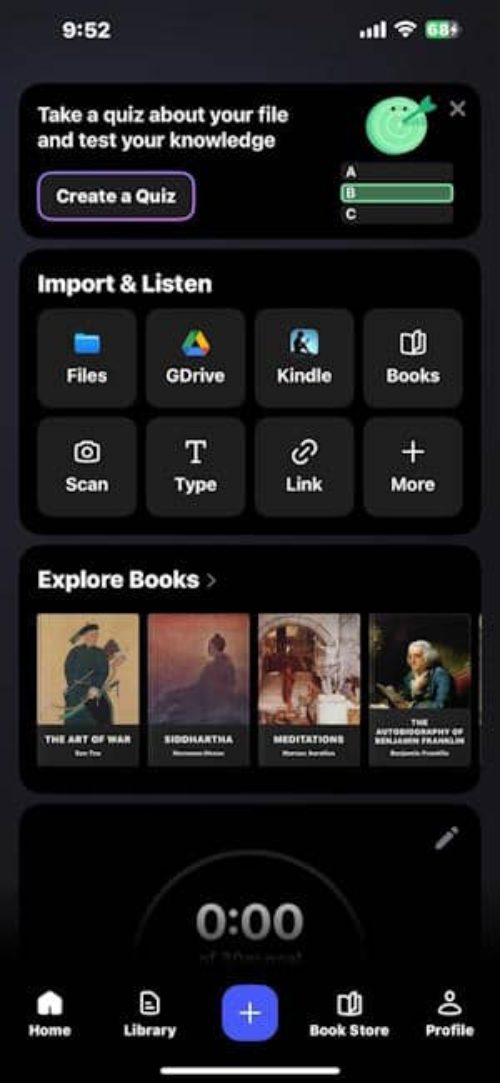
Once you have selected a free book, you can interact with it using Speechify:

Final conclusions
There are many reviews—both positive and negative—regarding the free (or trial) version and the premium version of Speechify. For this reason, as a regular user, I would not say that Speechify is a scam; rather, it is necessary to try it out and evaluate whether it fits the type of product you are looking for and need.
Therefore, be sure to take advantage of the free trial they offer and decide for yourself whether or not upgrading to the premium version makes sense for you. Do not purchase the annual subscription outright if you haven’t tested the product yet; it is simply a matter of common sense.
The ideal approach is to first test the product using the trial version; if you like it, try the premium version for a month, and if you end up being delighted with it, then upgrade to the annual plan—provided, of course, that you are considering purchasing a subscription.
Speechify is ideal for those who wish to listen to documents, articles, and books while on the go, or for anyone looking to multitask or consume content more quickly. In my opinion, the Chrome extension works wonderfully for reading content that I would rather not read manually.
It supports various languages, which is excellent for me, as I am from Colombia and a large portion of the content I read is in Spanish. I believe the application delivers optimal performance on both mobile devices and its web version; it runs very smoothly on both the frontend and the backend (everything operates without a hitch).